An SEF (SMAPS Exchange Format or Survey Exchange Format) import capability has been built into the program from the very beginning. Since a few other cave mapping programs can read this format, an SEF export function is also available, making the exchange of raw survey data with another program more easily achievable. SEF is certainly limited in what it can represent, but at least Walls can import the files it exports.
The import operation reads an SEF file and creates one project script (WPJ file) and a sequence of associated SRV data files. While the project preserves the SEF directory hierarchy, the SRV files, normally one per named survey or control point group, will contain the raw measurement data in a recognizable form. Included are the instrument units and corrections, #DATE directives, and LRUD passage dimensions.
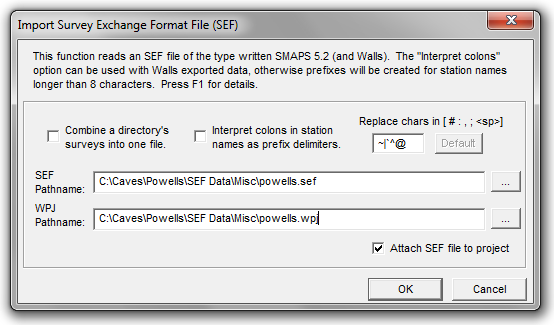
To import an SEF, choose the FILE | Import > SEF Data file... from the Walls main menu.
Some types of data, while surviving a Walls round trip, might not be accepted or handled the same same way by other SEF-capable programs. Those types include instrument and target heights, the four taping methods, underwater surveys, TO and FROM station LRUDs, and starting and ending station LRUDs. To alleviate this problem for data exchange, the SEF export function allows the selection of two levels of detail, both ultimately producing exactly the same vectors and fixed points prior to network adjustment. See Exporting SEF Files.
Since the SEF format can't represent everything likely to be found in Walls data, some advanced features simply won't be involved, particularly those controlling how data will be displayed. Even the location estimates might differ noticeably if there are loops and the default variances have been overridden in the data. Missing for stations will be notes, named flags, and multilevel name prefixes (the latter being converted to a short prefix by the exporter). Missing for vectors will be variance assignments (e.g., floated traverses) and user-added segment attributes that don't appear to be vector flags. (Trailing attributes such as "P" and "L", are exported by Walls to SEF as shot types.) You'll likely want to add some of these features to the imported project.
A Walls project created from an SEF file exported by another program will likely require some manual repairs due to limitations of the format and how the other developers used it. For the SEF definition I've largely relied on SMAPS itself and a series of emails written by Doug Dotson in 1992. This function certainly doesn't support all elements of the format as it was originally described, such as include files and control points with lat/long coordinates. Unfortunately, Doug Dotson's SMAPS 5.2, which implemented the format, is evidently no longer compatible with modern PCs running Windows.
Generated Data Files
The first four letters of the specified project name (the SEF file name by default) will be used by Walls to generate the 8-character file names of possibly many separate SRV data files, normally one for each SEF compass and tape survey or control point group. For example, POWELLS.SEF will ordinarily give rise to POWELLS.WPJ, POWE0001.SRV, POWE0002.SRV, etc. Any existing files with those names will be overwritten without warning.
Option: Combine a directory's surveys into one file
The import dialog also offers the option to combine adjacent surveys in a SMAPS directory into a single file. This will create fewer files of larger size. With this option, individual survey names can still be represented as a component of the segment attribute assigned to vectors. The import should produce a usable segment tree.
Station Name Considerations
When station names longer than eight characters are encountered during the import operation, a prefixed name is generated. For example, NAME1234567 will become NAM:E1234567. This is necessary because the base name length is limited to eight characters in Walls while SEF (and SMAPS) supports 12-character names. The only consequence of this is that just the last eight characters of the original names will be seen in certain program dialogs. Also, In Walls the prefixes are optionally excluded from name labels on maps. The SRV data files and coordinate listings will have the full prefixed names.
Option: Interpret colons in names as prefix delimiters
Selecting this option will alter the behavior described below and cause colons in names to be accepted as prefix delimiters. This will likely be useful only when importing a Walls-created SEF (which of course I've often had to do). If a base name longer than eight characters would result from keeping the colons, they are all replaced and a prefixed name is created. You'll be informed of such cases in the summary that's presented when the operation completes.
Option: Replace chars in [ # : , ; <sp>] with...
Five special characters, evidently possible in SEF station names, can't be used in Walls station names. Therefore, the pound sign (#), colon, comma, semicolon, and space character will, by default, be replaced with the tilde (~), vertical bar (|), back accent (`), caret (^), and at sign (@), respectively. For example, with the above "Interpret colons..." option unchecked, the name PEP:TEC100 will be converted to PE:P|TEC100. Since there's a possibility that these replacements will themselves cause name conflicts, the import dialog lets you customize the replacement characters. The import summary will report which substitutions were necessary.
Importing Georeferenced Projects
If the control points defined in the SEF have UTM coordinates, only the zone, not the geodetic datum, can be specified using SEF statements as far as I can tell. Therefore, if UTM coordinates are seen during the import operation, upon completion you're informed of the need to establish a geographical reference and to check the box that enables generation of UTM coordinates. Hopefully the datum will be either known or indicated by comments in the SEF file.
Declination Issues
There are two ways declinations can be specified in a Walls data file: indirectly by date and directly as a #units directive setting. A setting of "decl=0", for example, will override any declination derived from a preceding #date directive, resetting it to zero. This behavior could have been intended or not, depending on the instruments used for the survey. Therefore, when Walls imports an SEF file, the ordering of the #date and #decl directives in the SEF text will determine the ordering of the #date and #units directives in the data file that's written. To help guard against mistakes in directive ordering, caution messages will appear at locations where a zero declination assignment follows the #date directive. (When Walls imports Compass data directly, the #date directive will always follow the #units directive.)