To create a Survey (or SMAPS) Exchange File (SEF) for a selected portion of your project, right-click a branch (or root) of the project tree and choose Export > Data in branch as SEF file... from the context menu. A dialog will appear that lets you specify certain characteristics of the generated file, along with its name and location.
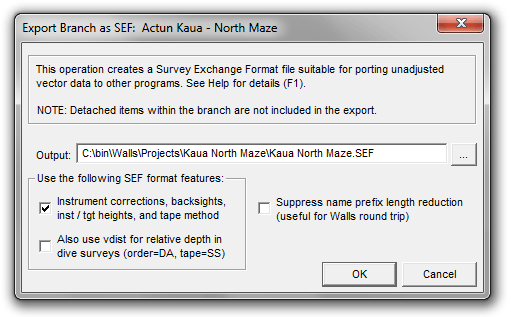
The following check boxes are presented -- all initially unchecked by default:
OPTION: Instrument corrections, backsights, inst / tgt heights, and tape method
If you're targeting another program besides Walls, you may need to leave this box unchecked if the program doesn't support these four features of the SEF format. In that case, all corrections but declination will be applied to a CT vector before it's written to the SEF as distance, azimuth, and inclination. The handling of LRUDs and declinations is not affected. At the very least, this option can be used for testing the export function. Geometrically, the defined vectors should be same as the ones produced with this option enabled.
OPTION: Also use vdist for relative depth in dive surveys (order=DA, tape=SS)
If you check the above box, you might also try checking this one if your project contains underwater surveys. The only advantage is that it will simplify (at least in Walls) the appearance of the raw data files after the SEF is imported -- no inclination column and with columns IAB and TAB (instrument and target heights above station) replaced with one column named FRDEPTH-TODEPTH. The numbers in that column would be the actual instrument height minus the target height for SS taping and zero inclination, where both instrument and target are considered located at the water's surface.
Note that the Compass survey editor has an identically-defined column for storing relative depth gauge readings in underwater surveys. Therefore, a direct (not SEF) import of a Compass underwater survey by Walls will create the equivalent tape=SS, order=DA (or AD) survey. The vdist measurement type in SEF seems to me the most natural way to represent the same thing, but of course the program you're targeting will need to support it.
OPTION: Suppress name prefix length reduction
A station name prefix, when concatenated with the base name, could easily exceed the SEF limit of 12 characters. By default, the exporter will replace the prefixes with shortened versions consisting of up to three uppercase letters followed by a single terminating colon. The replacements will be assigned in the order that new (possibly multilevel) prefixes are encountered during processing. If you do not select this option and you have long name prefixes, you'll be cautioned about this in a note at the bottom of the summary dialog:

If you then choose to import the SEF into Walls, say to test the result, you'll want to check the box labeled Interpret colons in station names as prefix delimiters in the SEF Import dialog. Failing to do that will cause the import function to generate new prefixes as necessary. The prefixed name CALENTURAS:A20, for example, would become CALENT:URAS|A20, with the original colon being replaced by a vertical bar (default replacement for colons). Apart from the names, the same survey will be produced.
SEF Export Limitations
An SEF export operation produces a data set consisting of unadjusted vectors, instrument corrections (optional), assigned declinations, and any associated LRUD measurements, all organized in an SEF directory hierarchy resembling the Walls project tree. Many things that define Walls data (notes, flags, name prefixes, segment attributes, floated or constrained vector components, etc.) are omitted because they aren't supported by the SEF format. The numbers representing measurements won't necessarily reflect the original units since Walls supports several formats..
While SEF seemingly allows the specification of many parameters describing raw survey measurements (e.g., #date, #decl, #fcc, #fic, etc.), their values can't vary within an individual survey or control point group,. They can, however, change multiple times within a SRV file. With every change of one of these parameters a new group must be generated by the exporter. These groups become the named surveys, possibly even separate files, within the importing program. The Walls SEF Import dialog offers the option to combine all groups within a parent directory (book) into a singe file, which can significantly reduce the total number of files written.