This function is an enhanced, built -in version of css2srv.exe, the command-line utility that was previously provided with Walls to import files produced by Larry Fish's Compass program. To access it, choose FILE | Import > Compass MAK or DAT file... from the Walls main menu.
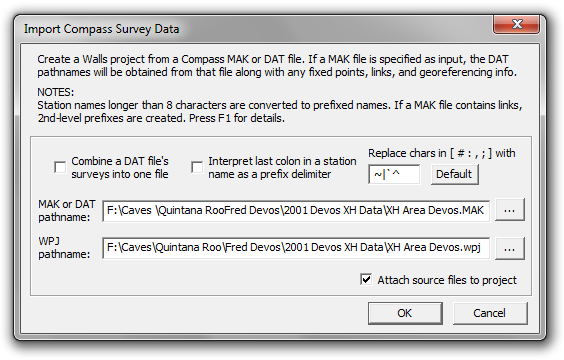
This function will process a Compass project (MAK) file to create a georeferenced Walls project incorporating data from many data (DAT) files. Besides the file names, the MAK file might contain the names and coordinates of fixed points, georeferencing info, and the names of connecting stations called links. The import function will also accept as input an individual DAT file, or multiple DAT files if an expression containing DOS-style wild cards (usually *.DAT) is entered for the source file name.
Represented in the resulting Walls project will be the raw instrument readings, specified units and corrections, #date directives, and LRUD passage dimensions. Shot "types", if non-blank, will appear as leaves of the segment tree. For example, vectors to be excluded from length computations or from plotting will appear in the tree under leaves labeled "L" or "P. Such leaves can be quickly detached prior to either operation. Excluded shots (type "X") are placed in comment blocks and "non-closed" shots (type."C") are constrained with zero variance assignments.
Also, underwater surveys will appear as they do in the Compass editor (and Walls), with depth gauge measurements represented as relative depths. Such surveys will have #units assignments "tape=SS" and "order=DA" (or "order=AD"). The relative depth (increase in elevation or decrease in depth) will appear as the third measurement.
OPTION: Combine a DAT file's surveys into one file
The created Walls project tree will contain a branch (book node) for each DAT file. If this option is checked, these branches will each contain at most two SRV data files. The one having the DAT file's name as title will contain all of that file's surveys. If the option isn't checked, separate files for the named surveys will be generated and attached to the branch in the order they appear in the DAT file.
Normally, you'll want to leave this option unchecked so that the individual surveys are more easily selected and edited. The survey names, often with appended comments, will serve as leaf titles in the project tree. Branch items can be rearranged, even sorted via a menu function.
On the other hand, if you believe it unnecessary to generate what could be many hundreds of data files, you can try the combine option. The segment tree will still show the individual survey names, since with this option the import function inserts a #Segment directive at the start of each survey.
In both cases, if either fixed points or links have been defined, a separate SRV file will appear as the branch's top leaf, with either "(Fixed Pts)", "(Links)", or "(Links and Fixed Pts)" appended to the title. When there are links, a block of comments will show the link names, their 2nd-level prefixes (more on those below), and the DAT files where they first appeared.
Station Name Alterations
When station names longer than eight characters are encountered during the import operation, prefixed names are generated. For example, SURF123456 will become SU:RF123456. This is necessary because the base name length is limited to eight characters in Walls whereas Compass supports 12-character names. The effect in Walls of such alterations is that only the base names will be seen in certain dialogs where they're normally not needed. Also, name prefixes (up to any level) are only optionally included in the name labels displayed on maps. The data files and coordinate listings, however, will have the prefixes attached to the base names.
OPTION: Replace chars in [ # : , ; ] with...
Four special characters, possible in Compass station names, will be replaced if they occur. The pound sign (#), colon, comma, and semicolon will, by default, be replaced with the tilde (~), vertical bar (|), back accent (`), and caret (^), respectively. For example, the name PEP:TEC100 will become PE:P|TEC100 upon import. Since these substitutions could conceivably cause name conflicts, the import dialog lets you customize the replacement characters by choosing ones that don't already exist in the names.
OPTION: Interpret last colon in a station name as as a prefix delimiter
This could be useful if the survey data had originated from Walls. With this option, the last colon in a name won't be replaced when it's followed by no more than 8 characters. In the example above, name PEP:TEC100 would be preserved.
Suggestions for improving the names: If the import summary states that substitutions and/or name-splitting was necessary, you may want to make the names more acceptable. You can use the Walls built-in search/replace features to accomplish this -- see Search Operations. If numerous data files would be affected, using an external program for this task might save some effort.
Issues with Links and Fixed Stations
Whereas Walls uses station name prefixes to avoid conflicts when surveys of different caves are compiled together, Compass uses the structure of the MAK file for this purpose. For each data file listed, the user can specify as links which names need to be "remembered" from earlier files in the sequence, possibly only to be passed on to later files that need them. If there is at least one link or fixed station, only the link names are remembered at the start of processing of that file. If there are no links or fixed stations, processing continues as if there were no break between files. In Compass, therefore, a station name can represent more than one station.
Fixed stations can appear in the MAK file alongside the links, each being a name followed by a set of coordinates in brackets. When processed by Compass, a fixed station is like a link in only one sense. If one is present, only the links will be carried over from previously listed data files. The name of the fixed station, unlike that of a link, is not remembered; a new station is created. Oddly, this means that simply assigning a fixed station to what would seem to be the appropriate data file could require one to locate all connecting stations and include them as links. It wouldn't matter if unique station naming was being enforced. A Compass user can avoid this problem, however, by introducing all fixed stations with the first data file.
The MAK file processing behavior of Compass is duplicated by Walls through the use of 2nd-level name prefixes. When a MAK file lists multiple data files, and has fixed stations and/or links assigned to files other than the first one, a #Prefix2 <SRV name> directive will appear near the beginning of each SRV file that's written. The link stations, when not in the data file that introduced them, will have this prefix prepended to their names. The overall appearance of the survey data shouldn't be much affected. Why 2nd-level prefixes? The import function has to reserve 1st-level prefixes for the possible splitting of names greater than 8-characters long.
Note: The importer deviates from Compass behavior when a data file is assigned a fixed station and a link with the same name. Whereas Compass ignores the link, the importer does what you might expect, which is to try matching the name with that of a station appearing in (or forwarded to) the previous file. If there's a matched station, its location is established with the fix. If the station has already been fixed, you're notified of a duplicate fix error. (The MAK file opens with the line highlighted.) It's likely that only an error in the MAK file will cause this difference in behavior.
.