The data files accepted by Walls are simple script-like text files with the default extension SRV. If you have written programs before, you can think of them as source files to be interpreted during a Walls compilation. The mostly "free-form" style, where keywords specify the meaning of data, has two main advantages. First, the files can resemble what is actually written in field books, so they are easy to proofread and largely self-explanatory. Second, it's easy to extend the format to handle new data types while still keeping old data files compatible. Unlike a proprietary database that requires a specific program for interpretation, the files can be safely archived.
There are a few disadvantages as well. The choice of ordinary text as the program's native data format brings us long-term flexibility with a slight ease-of-use penalty. A new user cannot immediately begin entering data without becoming familiar with at least a few features of the script format. Also, data entry errors are detected during compilation, not as they are being keyed in. Since syntax checking is quite thorough in Walls, a large chunk of freshly entered data may require a few stops and restarts before it cleanly compiles. When compilation is halted this way, an appropriate message is displayed and the questionable text pops up in an editor window.
Below is a small survey (10 shots) as it would appear in a Walls editor window. Note that comments are prefixed with a semicolon. The grid lines in this window appear because the option to display tab characters as vertical lines is turned on. The Walls editor makes it very easy to use tabs to separate line items. (See Survey Text Editor.)
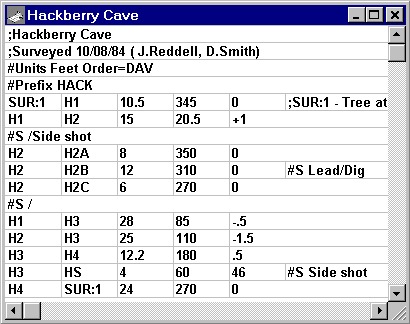
Most SRV files are small in size -- typed in by the surveyors themselves either during or immediately after an expedition. A typical file will consist of data obtained by one team on one surveying trip. It is the purpose of the project script (WPJ file) to link the possibly numerous SRV data files together in a way that they are easily managed and operated on. Except for possible future corrections, the data files themselves should not require revision once they are created and proofread.
Because of the need to handle preexisting data, the SRV format also supports the practice of lumping everything, even multiple unconnected caves, into one large text file. My preference, however, is to package a project -- a collection of many SRV files and one or more WPJ files -- into one ZIP archive for transport and backup.
General Description
The files are ordinary text (actually ANSI, a superset of ASCII) and can be created with the Walls built-in editor or with most other text editors, including Windows Notepad. During compilation, the program reads a file line-by-line while recognizing the semicolon character as a comment prefix. Except for the first whole-line comment, which Walls uses as the default title when the file is added to a project via the "browse" feature, anything on a line following a semicolon is ignored. Blank lines are also ignored.
Each line is read as a sequence of tokens (strings of displayable characters), where the number of spaces and tab characters between tokens is irrelevant. Except for certain text data, such as station and segment names, the case (upper or lower) of characters in a token doesn't matter. During compilation, if Walls encounters something it doesn't like, it displays an error message and highlights the offending line in an editor window.
You'll discover that the program is quite strict in deciding what numeric forms are reasonable. For example, not only will it reject negative distances and azimuths, but an entry like "+10" for anything but an inclination or above-station height will also trigger an error message. Why? Because entering measurements out of order is a very common mistake.
Special lines, called directives, have their first token prefixed with a pound sign (e.g., #Units, #Segment, #Prefix, etc.) and are used to specify such things as station and vector attributes, measurement units, and measurement column order. Other lines in the file define vectors between pairs of named stations. Ordinarily, these are the survey "shots" that resemble data lines in field books.
The range of measurement units now supported by the SRV format is much larger than it once was, but of course it still won't satisfy everyone. A complex format takes longer to describe and is harder to export to other programs. Already, it's not easy gathering data that's sufficiently diverse for testing purposes. For this reason I've tried to avoid adding features until they are actually needed for current projects. Nonetheless, I will continue to make changes to the format -- hopefully in a way that keeps old data files compatible.